
Code Track: Gated Product Delivery
See how Munk AI turns requirements into isolated Git worktree runs backed by automated code gates and human approval checkpoints.
Asking a standalone chat window to edit a production repository often leads to scope drift or broken branches. The Code track in Munk AI turns software delivery into a structured pipeline: isolated worktrees, automated quality gates, and human checkpoints.
Core Concepts
| Concept | What It Means |
|---|---|
| Codebase | A local Git repository attached to Munk AI representing a product line. |
| Work Item | A specific engineering task—a feature, refactor, or bug fix—created manually, from a GitHub Issue, or by a project shift. |
| Run | One execution of a Work Item through the pipeline. Every Run works inside an isolated Git Worktree, keeping your main working tree clean. |
Inside the Four-Pane Workbench
When you open the Code Workbench, the workspace is organized into four focused panes:
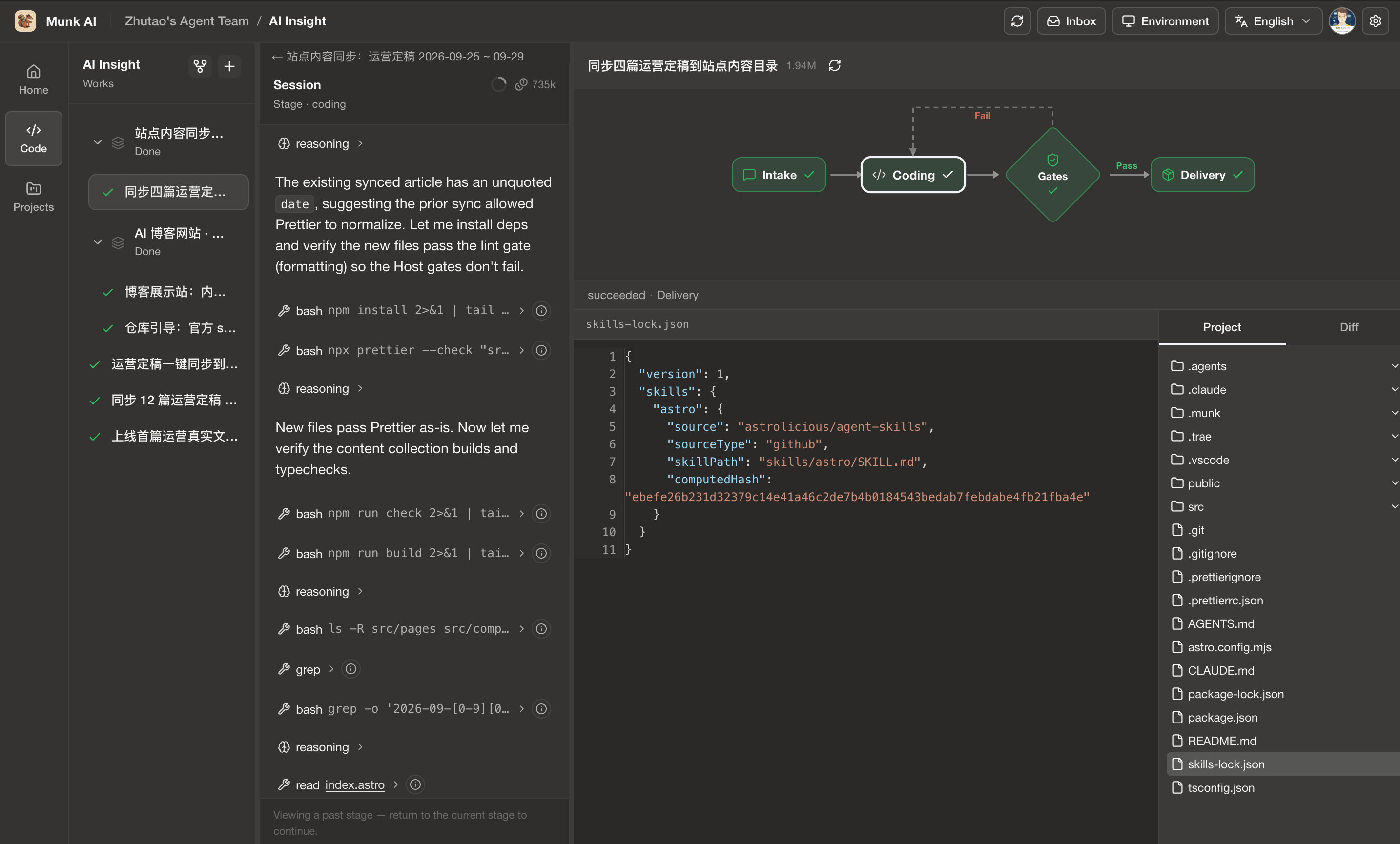
- Left Rail & Work Items List: Switch between products and see all active or waiting Work Items.
- Center Pane (Dialog & Evidence): Each conversational stage runs in its own dedicated agent session. During host stages like
Code Gates, this pane displays read-only build and test logs. - Top-Right Pane (Workflow Graph): Shows the live stage progression. When a Run pauses at a human checkpoint, an approval popover appears right next to the node.
- Bottom-Right Pane (File Tree & Diff): Inspect every file created or modified inside the isolated worktree.
How a Run Moves From Intake to Delivery
A typical Work Item flows through a linear pipeline:
Intake (Scope & PRD) → Plan (Optional) → Coding (Isolated Worktree) → Code Gates (Automated Checks) → Delivery (Gated Ship)
                                                  ↑                                 │
                                                  └──── Re-enters Coding on Fail ───┘
1. Intake: Lock Scope Before Writing Code
When you start a Work Item, the Intake Agent inspects the codebase, asks clarifying questions if anything is ambiguous, and writes a clear requirement spec (prd.md). Coding only begins once the scope is handed off. You can always step back to Intake to revise requirements later.
2. Coding & Code Gates: No Green Checks, No Delivery
After the Coding Agent makes changes in its dedicated Git worktree, the host automatically runs Code Gates—your configured build, typecheck, linter, and test suite.
- If a gate fails: The host routes the failure output straight back into the same Coding session so the agent can fix the issue and re-run the checks.
- If all gates pass: The pipeline unlocks the Delivery stage.
3. Delivery & Human Checkpoints: You Make the Final Call
Once Code Gates pass, the agent prepares the change summary and pauses at explicit checkpoints (Waiting) when your approval is required:
- Strict Safety Boundaries: Coding agents cannot force-push with raw tokens in bash, nor can they auto-merge remote GitHub pull requests.
- Controlled Delivery: Committing changes, merging cleanly into your local branch (Local Merge), pushing a feature branch, or opening a Draft PR all go through host-controlled tools—pausing at the Workflow popover or your Inbox whenever a human decision is needed.